
XGS-PON Deployment Guide: From GPON to 10G Without the Rip-and-Replace
Coexistence strategies and migration paths for existing GPON networks.
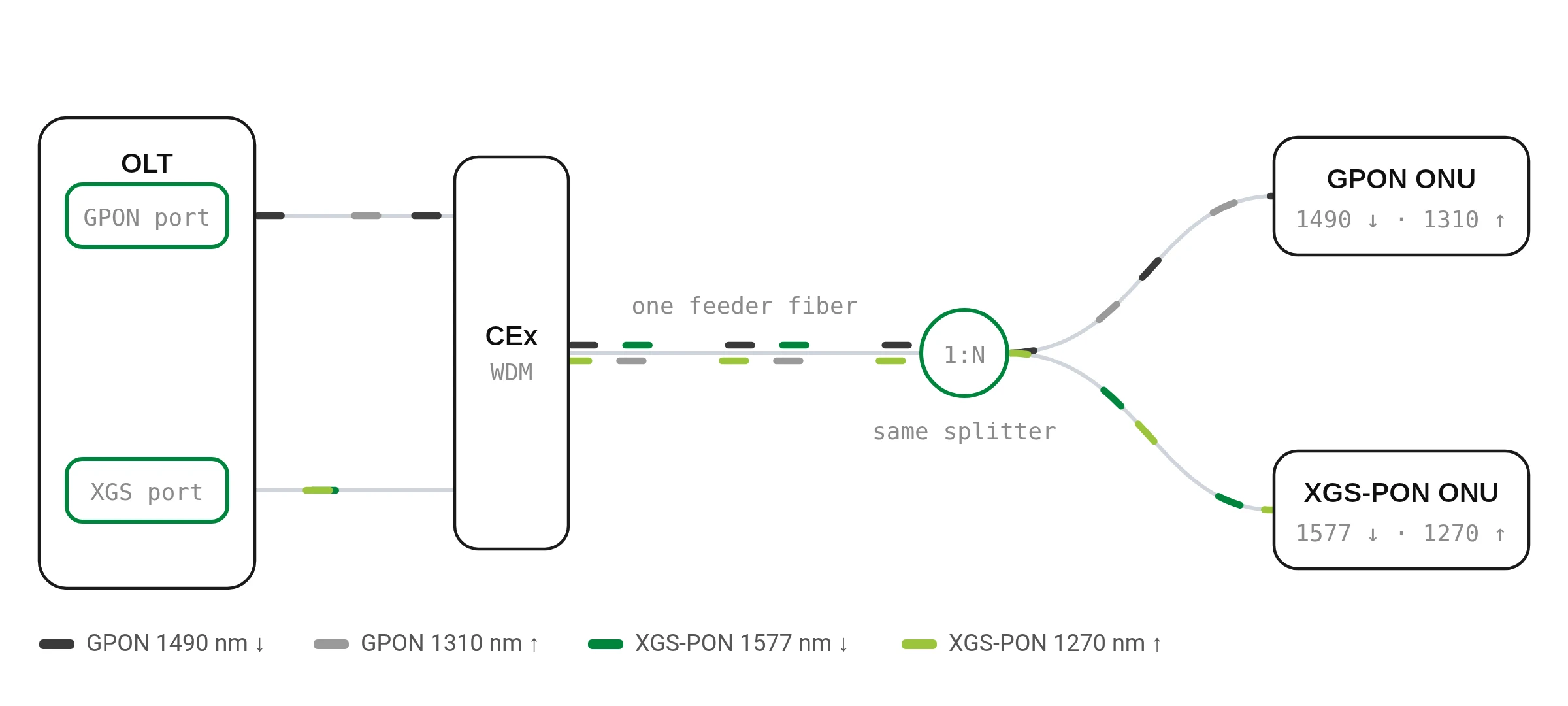
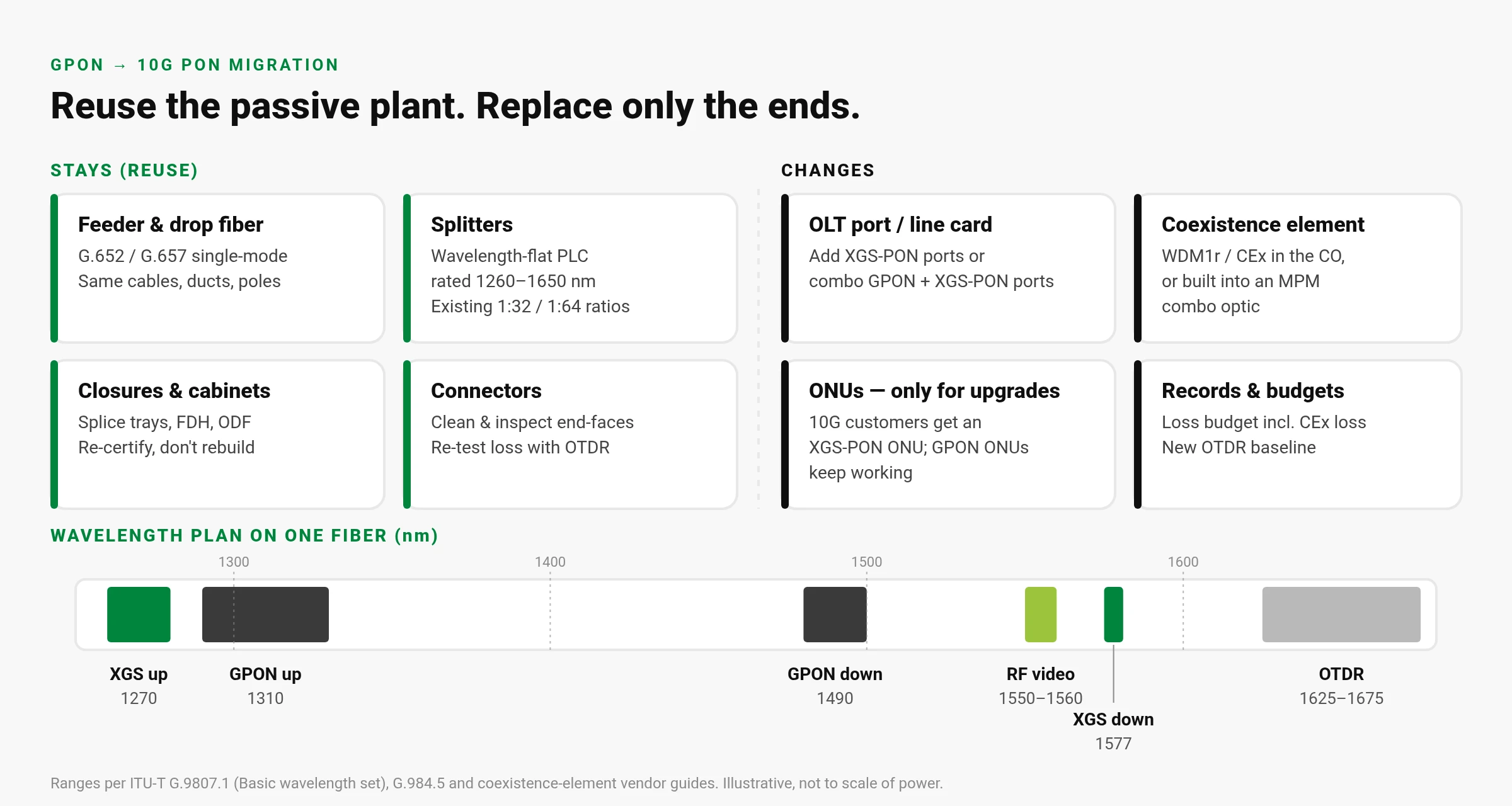
Upgrading from GPON to 10G PON without a rip-and-replace means running XGS-PON on the same fiber, splitters and closures you already have, alongside GPON. GPON and XGS-PON use different wavelengths, so a wavelength combiner at the central office (or inside a "combo" OLT optic) lets both share every strand. You change the ends of the network — OLT ports and, only for customers who upgrade, the ONU — and leave the outside plant where it is.[2][5]
This guide covers how coexistence works, what to check in the passive plant before you start, when ONUs actually need swapping, a step-by-step migration playbook, and the mistakes that most often turn a smooth overlay into a truck-roll marathon.
GPON, XG-PON and XGS-PON at a glance
All three are ITU-T standards built for the same kind of point-to-multipoint fiber network (the ODN). What differs is speed and wavelength:
| Technology | Standard | Nominal speed (down / up) | Downstream | Upstream |
|---|---|---|---|---|
| GPON | ITU-T G.984 | 2.5 / 1.25 Gbit/s | 1480–1500 nm | 1260–1360 nm (1290–1330 nm "reduced" option for coexistence) |
| XG-PON | ITU-T G.987 | 10 / 2.5 Gbit/s | 1575–1580 nm | 1260–1280 nm |
| XGS-PON | ITU-T G.9807.1 | 10 / 10 Gbit/s | 1575–1580 nm (basic set) | 1260–1280 nm (basic set) |
Sources: G.984.2 and G.984.5 for GPON wavelengths, G.9807.1 for XGS-PON, ZTE's XGS-PON white paper for the rate summary.[1][3][2][5]
Two details matter for migration. First, XGS-PON's basic wavelength set sits in different bands from GPON, which is what makes coexistence possible. (G.9807.1 also defines an optional set at 1480–1500 nm down / 1300–1320 nm up, which overlaps GPON, so it is not used where GPON stays live.)[2] Second, an XGS-PON OLT port using the basic set also serves XG-PON ONUs on the same port by time-sharing (TDMA), so XG-PON customers can stay put too.[2][5]
How coexistence works: one fiber, four wavelengths
G.9807.1 describes the migration directly: during the transition, a WDM1r combiner/splitter is installed so G-PON and XGS-PON work at the same time on the same ODN. It also notes that the operator can instead choose a full replacement of active devices — coexistence is an option, not a requirement.[2] The WDM1r (vendors often sell it as a coexistence element, CEx) combines the two downstream wavelengths onto one fiber and separates the two upstream wavelengths back to the right OLT port. Because the four wavelengths are isolated from each other, they don't interfere.[5]
At the customer end, each ONU must ignore the other system's light. G.984.5 defines the wavelength blocking filter (WBF) — "an optical filter to prevent an optical receiver from receiving unwanted optical signals" — and assumes WBFs are used when G-PON, video and next-generation PON share the same ODN.[3]
Reuse vs replace: what actually changes
Two ways to add 10G at the OLT
Option A: separate XGS-PON port + external WDM1r / CEx
Install XGS-PON line cards next to your GPON cards and patch both through a coexistence element into the existing feeder. Coexistence elements are sold in LGX modules, cassettes and rack-mount units, and many include extra ports such as RF video and an OTDR monitor port.[8] The trade-off: more patching and rack space, and the external multiplexer adds insertion loss — one vendor puts it at 1–1.5 dB — that comes straight out of your optical budget.[7]
Option B: combo (MPM) optics
A combo PON port puts the GPON and 10G transceivers and the WDM1r inside one pluggable optic, so one port serves both ONU types on one fiber. G.984.5 Amendment 2 Appendix IV calls this a multi-PON module (MPM) and specifies its optical parameters at the module output, so that the GPON budget on the ODN is the same as on the legacy network; MPM classes include B+, C+ and D.[6] Because the multiplexer is inside the optic, there is no separate box to patch and no extra loss on the ODN side.[7] The trade-off is that you are changing the OLT line card or optic, and you depend on your OLT platform supporting combo ports.
Passive-plant checks before you light 10G
"Reuse the ODN" doesn't mean "skip the ODN." Do these checks per PON before cutover:
- Loss class. GPON Class B+ covers 13–28 dB of optical path loss and Class C+ 17–32 dB.[1] XGS-PON is designed to work on these same 28/29 dB ODNs, and also defines classes N1 (29 dB), N2 (31 dB), E1 (33 dB), E2 (35 dB) and C+ (32 dB). Each class also has a minimum loss (for example B+ 13 dB, N1 14 dB) — very short links can overload a receiver.[2] Check your worst-case PON against the class of the XGS-PON optics you plan to buy.
- Add the coexistence loss. If you use an external WDM1r, add its insertion loss to the budget before you decide the PON still fits.[7]
- Splitters are wavelength-flat? Standard PLC splitters are typically specified across 1260–1650 nm; for example, one datasheet lists max insertion loss of 16.7 dB for a 1x32 and 13.5 dB for a 1x16 across that range.[9] Confirm from your splitter's datasheet that it covers 1270 nm and 1577 nm, not just the GPON bands — older or special splitters may not.
- Split ratio. G.9807.1 treats 1:64 as the minimum split support and notes that many operators built 1:32 to 1:64 ODNs, so existing ratios generally carry over.[2]
- Connector cleanliness. Inspect and clean every connector you touch, especially at the CEx and OLT patch field; end-face inspection is standardized in IEC 61300-3-35.[10]
- OTDR re-certification. Shoot a fresh OTDR baseline after the coexistence element goes in, so future faults are compared against the new plant, not the old one. If you monitor in service, use the out-of-band maintenance wavelength (ITU-T L.41) and a CEx with a monitor port; one product guide lists that monitor band as 1625–1675 nm.[11][8]
When do ONUs need to be swapped?
Only when the customer moves to 10G. Existing GPON ONUs keep working on the GPON wavelengths; customers who upgrade get an XGS-PON (or XG-PON) ONU on the same drop.[2][5] Two situations force a wider swap:
- You choose full replacement. If you replace GPON line cards with XGS-PON-only cards and no coexistence, every GPON ONU on that PON must change at the same time.[6]
- Legacy ONUs without proper filtering. G.9807.1 says the WDM overlay per G.984.5 must be implemented in all ONUs to assure smooth migration.[2] If an old ONU model shows errors once 10G light is on the fiber, check its WBF compliance with the vendor and plan replacement for that model.
Step-by-step migration playbook
- Inventory. List every PON: OLT port, split ratio, measured loss, splitter models, ONU models and any RF video overlay.
- Pick the coexistence method per site: external WDM1r/CEx (keeps existing GPON cards) or combo/MPM optics (fewer boxes, no extra ODN loss).
- Run the budget. Worst-case path loss + coexistence loss vs the class of your XGS-PON optics; flag PONs that are short of margin.
- Check splitters and ONUs against the new wavelengths (1270 / 1577 nm) and WBF requirements.
- Pilot one PON. Insert the CEx or combo optic in a maintenance window, clean and inspect every connector, and confirm all GPON ONUs come back with normal receive power.
- Re-baseline with an OTDR and save the trace.
- Upgrade customers on demand — swap only the ONUs of customers buying 10G tiers.
- Roll out PON by PON; retire GPON ports when they empty.
Cost and disruption: three paths compared
Real costs depend on your vendor pricing and plant, so this is a qualitative comparison:
| Rip-and-replace | External WDM1r / CEx | Combo (MPM) optics | |
|---|---|---|---|
| Outside plant work | None if ODN is reused; all ONUs change | None beyond re-test | None beyond re-test |
| ONU swaps | Every customer, at once | Only upgrading customers | Only upgrading customers |
| OLT changes | Replace GPON cards | Add XGS-PON cards; keep GPON | Replace with combo cards/optics |
| Extra loss on ODN | None | Yes (CEx insertion loss) | No extra ODN-side loss |
| CO space & patching | Same as today | More (CEx + extra jumpers) | Same as today |
| Customer disruption | High (coordinated cutover) | Low (short window per PON) | Low (short window per PON) |
Keeping CATV / RF video overlay
If you deliver broadcast video over the PON, the RF overlay can stay. G.984.5 reserves 1550–1560 nm for video distribution, and G.9807.1 explicitly shows G-PON, XGS-PON and video overlay coexisting through a WDM1r.[3][2] Two practical points:
- Choose a coexistence element with an RF port, so the video wavelength is combined in the same device; product guides list GPON + XGS-PON + RF combinations.[8]
- The GPON B+ budget in G.984.2 is stated to include non-integrated WDM filters for video overlay and enhancement-band services — so recheck the budget whenever you add or move filters.[1]
Looking ahead: 25G and 50G PON on the same plant
ITU-T's higher-speed PON series (G.9804) aims to keep the characteristics of legacy PON systems so it stays backward compatible with existing ODNs, and describes smooth migration scenarios from legacy PON.[4] In practice that means more wavelengths on the same fiber: one coexistence product guide lists 50G-PON options at 1340–1344 nm downstream that coexist with GPON or with XGS-PON.[8] Choosing a CEx with spare ports — and keeping your ODN clean and documented — makes the next step easier too.
Common mistakes
- Forgetting the CEx loss on PONs that were already near the edge of their class.
- Assuming every splitter is wavelength-flat without checking the datasheet.
- Using XGS-PON optics with the optional wavelength set on a PON where GPON stays live — it overlaps GPON's band.[2]
- Skipping connector inspection after re-patching at the CO.
- Not re-baselining the OTDR, so the new CEx later looks like a fault.
- Swapping every ONU up front when only upgrading customers need new hardware.
FAQ
Can GPON and XGS-PON run on the same fiber?
Yes — they use different wavelengths, so a WDM1r coexistence element or combo optic lets both share the same ODN without interfering.[2][5]
Do I have to replace my splitters?
Usually not: standard PLC splitters are specified across 1260–1650 nm, which covers both GPON and XGS-PON, but confirm it on your splitter's datasheet.[9]
Do all customers need a new ONU?
No — only customers who move to a 10G service need an XGS-PON ONU; GPON ONUs keep working on their own wavelengths.[2]
What is a combo PON optic?
It is an OLT pluggable that contains GPON and 10G transceivers plus the WDM1r in one module, defined as a multi-PON module (MPM) in G.984.5 Amendment 2.[6]
Will my RF video overlay still work?
Yes, if the coexistence element passes the 1550–1560 nm video band; ITU-T G.9807.1 shows GPON, XGS-PON and video overlay coexisting.[2][3]
Plan your GPON-to-10G upgrade with UGrid
UGrid offers the U10 XGS-PON OLT (G.9807 / G.987, multi-vendor ONU support), UNT XGS-PON SFP+ ONTs (G.9807.1), the FiberTrix 24-port XG(S)-PON/GPON MDU, and the U5 and U8 GPON OLTs — the U8 combines an outdoor GPON OLT with an 8-way EDFA for CATV overlay. Pair them with uFT remote fiber testing to re-baseline your plant.
Request a Quote · U10References
- ITU-T Recommendation G.984.2, Gigabit-capable passive optical networks (G-PON): Physical media dependent (PMD) layer specification. https://www.itu.int/rec/T-REC-G.984.2
- ITU-T Recommendation G.9807.1, 10-Gigabit-capable symmetric passive optical network (XGS-PON). https://www.itu.int/rec/T-REC-G.9807.1
- ITU-T Recommendation G.984.5, Gigabit-capable passive optical networks (G-PON): Enhancement band. https://www.itu.int/rec/T-REC-G.984.5
- ITU-T Recommendation G.9804.1, Higher speed passive optical networks – Requirements. https://www.itu.int/rec/T-REC-G.9804.1
- ZTE, XGS-PON Technical White Paper. https://www.zte.com.cn/content/dam/zte-site/res-www-zte-com-cn/index-resource/global/enterprise/homepage/b1-campus-network/XGS-PON%20Technical%20White%20Paper-1.pdf
- ZTE, Combo PON Technical White Paper. https://www.zte.com.cn/content/dam/zte-site/res-www-zte-com-cn/mediares/zte/files/pdf/white_book/Combo_PON_Technical_White_Paper-EN2125.pdf
- ZTE Technologies, “Three-Rate Combo PON Enables Smooth Evolution to 10G GPON” (2021). https://www.zte.com.cn/global/about/magazine/zte-technologies/2021/4-en/special-topic/6.html
- Montclair Fiber Optics, Coexistence Element (CEx) Product Guide. https://www.montclairfiber.com/wp-content/uploads/2019/07/Coexistence-2025-Product-Guide-Montclair.pdf
- Tii Technologies, PLC9 Series fiber splitter datasheet. https://tiitech.com/wp-content/uploads/datasheets/fiber-splitters/PLC9-Series.pdf
- IEC 61300-3-35:2022, Visual inspection of fibre optic connectors and fibre-stub transceivers. https://webstore.iec.ch/en/publication/64254
- ITU-T Recommendation L.41, Maintenance wavelength on fibres carrying signals. https://www.itu.int/rec/T-REC-L.41